Usage Notes for Underwater Aquaculture Cameras (25x Zoom): A Comprehensive Guide to Installation, Operation, and Maintenance
Hits: 750 Time: January 04,2026
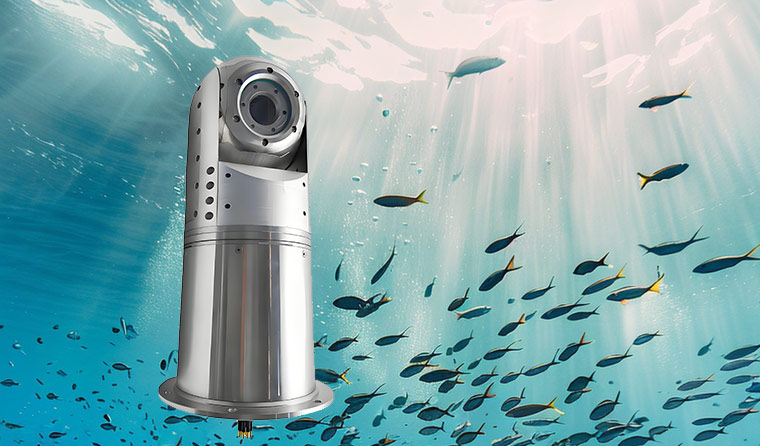
Equipped with a high-precision optical architecture and anti-interference design, the 25x zoom underwater aquaculture camera can meet the dual needs of "wide-area coverage + detail capture." However, the harsh characteristics of the underwater environment—such as high pressure, corrosion, and turbidity—impose strict requirements on the installation, operation, and maintenance of the equipment. Following scientific usage specifications not only prevents equipment failures (e.g., waterproof failure, zoom lag, image quality degradation) but also extends its service life and ensures the accuracy of monitoring data. Below are the core usage notes combined with its technical characteristics:
I. Installation and Deployment: Precisely Adapt to Scenarios and Lay a Solid Protective Foundation
-
Depth and Pressure Adaptation: Although the equipment is rated for 50 meters water depth protection, a safety margin should be reserved during actual installation. It is recommended that the maximum operating water depth does not exceed 80% of the rated value (i.e., 40 meters) to avoid accelerated aging of seals due to long-term high pressure. For scenarios such as deep-sea cages, select models with pressure compensation modules. Before installation, check that the pressure-resistant window glass is free of scratches and cracks to prevent damage caused by water pressure impact.
-
Installation Position and Fixation: Use stainless steel brackets for fixation to ensure a secure connection between the bracket and aquaculture facilities (cages, pond banks). This avoids equipment shaking caused by water flow, which can affect image stability during 25x zoom. The lens should avoid direct exposure to light sources (e.g., sunlight reflection on the water surface, underwater fill lights) to prevent focus loss during zooming due to strong light interference. At the same time, keep it away from vibration sources such as aerators and water pumps to avoid excessive wear of the anti-shake motor.
-
Cable and Interface Protection: Use waterproof cables and thread them into PVC conduits. The cables should be fixed with redundant length (to avoid pulling by water flow). The interfaces should be protected with double layers of waterproof tape and sealed connectors. All connection points must be at least 30cm above the water surface, and a "drip loop" should be created to prevent rainwater from flowing into the equipment along the cables. For 5G/4G transmission, ensure the antenna is installed in a location with unobstructed signals, away from metal obstacles.
-
Lens Calibration and Debugging: After installation, perform mechanical calibration. Adjust the camera position through real-time images to align the lens center with the spherical center of the dome port, reducing distortion and resolution loss during zooming. During debugging, focus on testing the image clarity at the extreme 25x zoom. If defocus occurs, perform "zoom reset calibration" through the device or APP to avoid motor jamming caused by forced zooming.
II. Operation: Standardize Function Usage and Avoid Technical Wear
-
Proper Use of Zoom Function: The 25x optical zoom relies on a precision ball-type anti-shake motor. During operation, avoid "rapid switching of zoom multiples" and "long-term stay at extreme zoom states." Allow an interval of at least 1 second between each zoom operation to prevent motor overheating due to overload. When monitoring fish details, first locate the target area in wide-angle mode, then gradually zoom in to the required multiple to reduce unnecessary wear on the mechanical structure caused by invalid zooming.
-
Environmental Adaptation Adjustment: When using in turbid water (e.g., Zhoushan turbid water aquaculture areas), enable the AI de-turbidity algorithm before starting zooming to avoid excessive image noise caused by forced zooming without filtering scattered light. In low-light environments, prioritize enabling the infrared fill light module before adjusting the zoom multiple to prevent increased image blurriness during zooming in low light.
-
Avoid Illegal Operations: Do not open the battery compartment or interface cover underwater. Even in shallow water, operate only in a dry environment on land with dry, sand-free hands. Do not tap or collide the lens or body while the device is working to prevent displacement of optical lenses and failure of the anti-shake motor.
-
Parameter Preset Optimization: Preset parameters according to the aquaculture scenario. For example, set the "automatic zoom inspection mode" (cyclic switching between 5-25x) for deep-sea cage monitoring, and lock the commonly used zoom range (e.g., 5-15x) for fixed-point pond observation to reduce wear on the equipment caused by frequent extreme zooming. At the same time, turn off unused functions (e.g., redundant fill light, high-frame-rate recording) to reduce power consumption and heat generation.
III. Maintenance: Regular Upkeep to Extend Equipment Life
-
Daily Cleaning and Rinsing: Immediately rinse the entire device with fresh water after each use (especially in seawater environments), focusing on cleaning the lens surface, seals, and interfaces. Soak in clean water for 10-15 minutes to dissolve salt and sand. Use a lint-free soft cloth for cleaning to avoid scratching the ED (Extra-low Dispersion) lenses and pressure-resistant window glass. For oil stains on the lens surface, gently wipe with a dedicated lens cleaning fluid; do not use chemical reagents such as alcohol or disinfectant.
-
Seal Maintenance: Inspect the waterproof O-rings monthly, clean impurities in the grooves, and evenly apply a dedicated silicone-based lubricant (avoid petroleum-based lubricants that can corrode the O-rings). It is recommended to replace the O-rings every 6-12 months. For long-term storage, remove the battery and store the O-rings separately in a dry environment to avoid aging and adhesion.
-
Zoom and Sensor Maintenance: Perform a "full-stroke zoom calibration" every quarter. Control the lens to switch slowly from 1x to 25x through the APP to remove tiny impurities that may remain inside the lens. If zoom lag occurs, do not operate forcefully; contact after-sales service for disassembly and cleaning to avoid damage to the rare earth permanent magnet motor. Regularly inspect the sensor; if fixed noise or black spots appear in the image, clean the sensor in a timely manner to prevent permanent damage caused by adhesion of underwater pollutants.
-
Storage and Idle Handling: When the equipment is not in use for a long time, clean and dry it thoroughly before storing in a cool, well-ventilated place, avoiding direct sunlight (to prevent shell aging and lens degradation). The ambient temperature should be maintained between -10℃ and 30℃. Before storage, reset the zoom lens to 1x to reduce motor load. Fully charge the battery before separate storage and recharge it every 3 months.

-
IV. Safety and Emergency Response: Avoid Risks and Quickly Handle Failures
-
Troubleshooting Taboos: If the equipment experiences waterproof failure (e.g., water ingress into the body, fog in the image), immediately cut off the power and stop using it. Do not disassemble it yourself; contact professional after-sales service for sealing inspection and maintenance to avoid expanding the fault. If the zoom function fails, first check for unstable voltage. If the problem persists after excluding power supply issues, do not manually adjust the lens forcefully.
-
Extreme Environment Response: Suspend use in high-temperature (exceeding 60℃) or low-temperature (below -30℃) environments to avoid damage to core components such as the anti-shake motor and sensor due to temperature extremes. Before severe weather such as typhoons and heavy rains, inspect the equipment fixation and temporarily remove the equipment if necessary to prevent damage caused by strong winds and huge waves.
-
Data Security Backup: Regularly export monitoring videos and data to avoid data loss due to equipment failure. If the equipment supports local storage, select an industrial-grade waterproof SD card. When replacing the SD card, operate in a dry environment and ensure no moisture or impurities in the card slot before insertion.
For more information about underwater aquaculture camera, please visit the homepage.